Shield Silhouette: How a Simple Shape Can Transform Your Creative Projects
There is something about a shield silhouette that feels both ancient and modern at the same time. It is a shape that carries weight — protection, strength, honor — yet it adapts effortlessly to contemporary design. Whether you are building a brand from scratch, crafting a gaming emblem, or preparing files for your cutting machine, the 20 Shield Silhouette SVG Bundle offers a surprising amount of creative freedom. And the best part? You do not need to be a professional designer to make it work.
What Makes a Shield Silhouette So Versatile
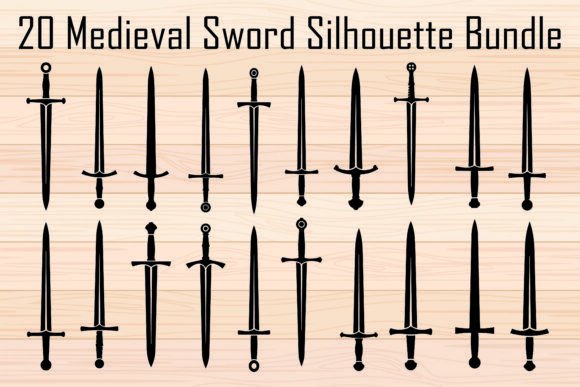
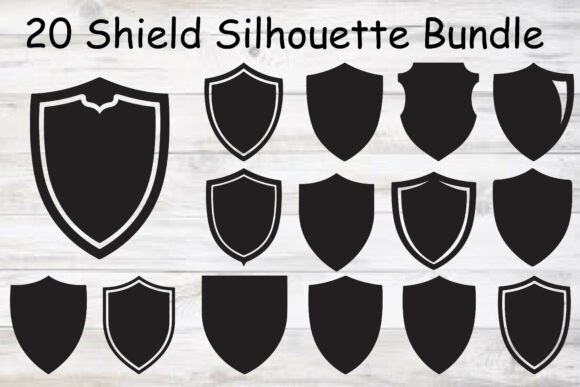
A shield silhouette is essentially the outline of a shield, stripped of internal detail. That simplicity is exactly what makes it powerful. Because the shape is clean and recognizable, it becomes a blank canvas for whatever you want to layer on top — text, graphics, gradients, or even other silhouettes. In this bundle, you get twenty distinct shield shapes, each with its own personality. Some are tall and narrow, ideal for medieval themes. Others are wider and more rounded, better suited for modern logos or sports branding.
The black silhouette style means you can drop these directly into your project without worrying about background colors or messy edges. They work as standalone graphics or as cut lines for materials like vinyl, cardstock, or laserable wood.
Real-World Scenarios Where Shield Silhouettes Shine
Imagine you are helping a friend launch a local sports league. They need a logo that feels tough and team-oriented but also looks good on a hat or a jersey. A shield silhouette gives you that foundation instantly. You can place the team name inside, maybe add a star or a chevron, and suddenly you have something that looks like it belongs in professional athletics. The 20 Shield Silhouette SVG Bundle gives you enough variety to test different shapes until one feels right for the vibe of the team.
Or consider a different scenario altogether. You run a small Etsy shop selling custom tumblers and stickers. A customer asks for a design with a fantasy knight theme. Instead of sketching a shield from scratch, you pull one of these silhouette files, resize it to fit the product, and layer in some distressed textures. The result looks handcrafted and original, but the heavy lifting was already done by the clean vector art.
Another situation: a local brewery wants to brand a seasonal ale with a medieval tavern feel. The label needs to look like something you would find on a barrel in a castle cellar. A shield silhouette immediately sets the tone, and because the SVG files are fully scalable, you can print them on a tiny bottle cap or a large chalkboard sign without losing quality.
Gaming Graphics and Digital Content Creation
Gaming is one of the biggest spaces where shield silhouettes show up. Whether you are designing a clan emblem for an online multiplayer game, creating assets for a tabletop RPG, or putting together a Twitch overlay, a strong shield graphic communicates rank, alliance, or achievement. The 20 Shield Silhouette SVG Bundle is especially useful here because the shapes are distinct enough to tell different factions apart. You could assign one shield silhouette to one guild and a different one to another, helping players visually identify their group even in fast-paced gameplay.
I have seen streamers use these silhouettes as starting points for their channel badges or as part of their intro animation. Because the files are provided in PNG with transparent backgrounds, you can drop them directly into OBS or Streamlabs without extra editing. That kind of convenience matters when you are focused on content, not file format headaches.
Laser Cutting and Engraving Projects
Laser cutting is a space where precision matters, and the clean black silhouette style of these vectors is almost made for it. If you run a laser engraving business, you know that a slightly jagged vector can ruin a piece of wood or acrylic. These files are high-quality and clean, so your laser follows a smooth path every time. Consider making keychains, coasters, or wall art with a shield theme. You might engrave a family crest inside the shield silhouette or cut it out entirely and layer it over a contrasting material.
I have noticed that crafters who work with leather also appreciate these shapes. A shield silhouette tooled into a leather journal cover or a belt pouch adds a rugged, historical feel. And because the SVG files are editable, you can adjust the size to match your workpiece exactly.
Different Users, Different Benefits
Small business owners often need branding elements that look professional without requiring a design degree. The 20 Shield Silhouette SVG Bundle gives them a library of shapes that can be dropped into Canva, Illustrator, or even Microsoft Publisher. They do not need to learn complex vector editing to get a result that looks polished.
Hobbyist crafters with Cricut or Silhouette Cameo machines will appreciate the ready-to-cut SVG files. You can load them into Design Space or Silhouette Studio, resize, and send to the mat in minutes. Whether you are making vinyl decals for a water bottle or iron-on transfers for a t-shirt, the silhouette shape cuts cleanly without extra nodes or weird angles.
Professional designers might use these as a base to build upon. The fully scalable vector format means you can modify the curves, add internal elements, or combine multiple shield shapes to create something entirely new. It saves you the initial drafting time and lets you jump straight to refinement.
Educators and workshop leaders sometimes need quick assets for lessons on heraldry, symbolism, or design history. These shield silhouettes give students a starting point for creating their own coats of arms or logos. It turns a theoretical lesson into a hands-on activity.
Common Considerations Before You Download and Use
One thing to keep in mind with any silhouette bundle is that the shapes are intentionally simple. That is a strength, but it also means you will likely want to add your own text, imagery, or patterns to make the design feel complete. If you are looking for a ready-to-print logo with full detailing, a silhouette is just the first layer. But if you enjoy customizing and making things your own, these files are a goldmine.
File format matters depending on your workflow. The bundle includes SVG, EPS, PNG with transparent background, JPG, and PDF. For most cutting machines, SVG is the way to go. If you are printing artwork or using it in a document, the transparent PNG gives you flexibility without the need for vector software. I always recommend keeping the original SVG files stored safely, because they are the most editable option down the line.
Another thing worth noting is that while these are high-quality vectors, not all design software handles SVG imports the same way. Programs like Adobe Illustrator and Inkscape will give you full control over the paths. Simpler apps like Cricut Design Space will import them cleanly but offer fewer editing options. That is fine for cutting projects, but if you plan to heavily modify the shape itself, stick with a proper vector editor.
Commercial Use and Licensing Confidence
This bundle comes with both personal and commercial use rights, which matters if you plan to sell items that incorporate the designs. Whether you are making t-shirts for a small business or selling digital downloads yourself, you want to know the licensing is solid. Just be aware that commercial use typically means you cannot resell the SVG files themselves as a standalone product. You are free to use them in physical products and most digital goods as long as they are part of a larger design.
Strengths and Honest Limitations
The biggest strength of this bundle is the variety. Twenty unique shield shapes means you are not stuck with one look. You can match the silhouette to the mood of the project — a more angular shield for something aggressive or competitive, a softer curved one for something traditional or elegant. The instant digital download is another obvious plus. You do not wait for shipping; you just grab the files and start creating.
On the limitation side, these are black silhouettes by default. If your project calls for a colored shield right out of the box, you will need to add that yourself. That is easy enough in any design software, but it is worth mentioning for absolute beginners who might expect pre-colored artwork. Also, because the bundle covers a range of styles, not every silhouette will fit every project. That is fine — you pay for the twenty and use the ones that work for you.
Putting Shield Silhouettes to Work in Your Own Projects
If you are thinking about how to actually use these, start by browsing the collection and picking out two or three shapes that resonate with your project theme. Drop them into your software and experiment with scale. Sometimes a shield silhouette that looks too wide at full size works beautifully when scaled down and paired with text. Try rotating it slightly for a dynamic feel, or layering two shields of different sizes for a nested look.
For vinyl decals, keep the design relatively simple. A shield silhouette combined with a short word or a single icon cuts cleanly and adheres well. For t-shirts, consider heat transfer vinyl in a contrasting color. A matte black shield on a heather gray shirt has a subtle, premium look. For laser engraving, think about how the negative space will read. A shield silhouette cut into wood grain often looks better than a solid filled shape because the wood texture shows through.
I have seen people use these shields as corner accents on certificates, as part of wedding invitation suites with a medieval or rustic theme, and even as stencils for painting furniture. The more you look at the shape, the more you realize it fits into places you would not immediately expect.
The 20 Shield Silhouette SVG Bundle is not just a collection of graphics. It is a set of tools that adapt to you, whether you are a seasoned designer or someone picking up a cutting machine for the first time. The clean silhouettes, multiple file formats, and instant access make it a practical choice for anyone who needs a strong, recognizable shape to build around. And in a world where visual identity matters more than ever, having twenty versatile shields at your fingertips means you are always ready to create something that stands firm.